Mobile App Security Checklist: A 30-Day Plan to Go From Zero to Secure
If you've never done mobile application security testing before, you're probably feeling a bit overwhelmed right now. Where do you even start? What tools do you need? How long will this take? Don't worry — we've all been there.
The good news is that getting started with mobile application security doesn't have to be complicated or expensive. You don't need a team of security experts or a million-dollar budget. What you need is a plan that breaks everything down into manageable, weekly chunks.
I have outlined a 30-day guide below that will take you from complete beginner to having a solid mobile application security testing process in place. We'll cover what to do each week, what usually goes wrong (and how to avoid it), and some quick wins you can get early on.
Why Mobile App Security Testing Matters
Before we dive into the plan, let's talk about why these matters. Mobile apps handle more sensitive data than ever before — user credentials, payment information, personal photos, location data. When these apps aren't properly secured, the consequences can be brutal.
Just look at what happened to companies like Bumble, which took over 8 months to fix basic security vulnerabilities that exposed 100 million users' data. Or consider that the average cost of a data breach hit $4.88 million in 2024. The math is simple: spending time on security now saves you money later.
Your 30-Day Mobile App Security Checklist
Week 1: Set Up Your Mobile Security Testing Environment
Goal: Get your testing environment ready and understand what you're working with.
Day 1-2: Choose Your Testing Environment
The biggest mistake teams make is trying to test on physical devices right away. This creates a bottleneck because you're limited by hardware, and setting up test scenarios becomes complicated.
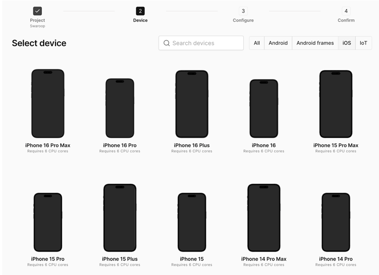
Instead, start with a virtualized device platform like Corellium. This gives you the flexibility to test different device configurations, iOS and Android versions, and scenarios without needing a room full of phones. You can spin up new virtual devices in seconds and snapshot them at different states for consistent testing.
Day 3-4: Install Essential Tools
Keep it simple for now. You'll need:
-
ADB (Android Debug Bridge) for device communication
-
APKTool for app decompilation
-
JADX for viewing source code
-
A proxy tool for intercepting network traffic
Don't try to install everything at once. Focus on these basics first.
Day 5-7: Understand Your App
Before you can secure something, you need to understand how it works:
- Install your app in the testing environment
- Map out the main user flows (login, data entry, payments, etc.)
- Identify what sensitive data the app handles
- Note which third-party services it connects to
Quick Win: Run your app in the virtual environment and just observe how it behaves. You're not looking for vulnerabilities yet — just getting familiar with what you're testing.
Common Mistake: Teams often skip this step and jump straight into testing. But if you don't understand your app's normal behavior, you won't recognize when something's wrong.
Week 2: Static Analysis and Code Review
Goal: Examine your app's code and configuration without running it.
Day 8-10: Decompile and Examine Your APK
Static analysis means looking at your app's code while it's not running. This helps you find issues like:
- Hardcoded passwords or API keys
- Weak encryption implementations
- Insecure data storage practices
Start by extracting your APK file and using tools like JADX to convert it back to readable Java code. Don't get overwhelmed by the amount of code — focus on searching for keywords like "password," "key," "token," and "secret."
Day 11-13: Analyze the AndroidManifest.xml File
This file is like your app's blueprint. Check for:
-
Excessive permissions - Does your app really need access to the camera, microphone, or location?
-
Exported components - Are any activities or services accidentally exposed to other apps?
-
Debug settings - Is debugging enabled in production builds?
-
Backup settings - Can app data be backed up inappropriately?
Day 14: Automated Static Analysis
Manually reviewing code is time-consuming and error-prone. Run automated static analysis tools to catch common issues quickly. Many problems that seem complex are actually variations of the same basic mistakes.
Quick Win: Search your codebase for hardcoded strings that look like credentials. Even junior developers can spot "password123" in the source code.
Common Mistake: Trying to analyze everything manually. Use automation to handle the routine stuff so you can focus on the complex security logic.
Week 3: Dynamic Mobile Security Testing
Goal: Test your app while it's actually running to find runtime vulnerabilities.
Day 15-17: Set Up Traffic Interception
Dynamic analysis means testing your app while it's running. Start by setting up a proxy to intercept network traffic between your app and its servers.
Configure your virtual device to route traffic through your proxy tool. This lets you see:
-
What data your app sends to servers
-
Whether it's using proper encryption
-
If sensitive information is transmitted in plain text
Day 18-20: Test Authentication and Session Management
Focus on these key areas:
-
Login bypass attempts — Can you access protected features without proper authentication?
-
Session handling — What happens if you modify session tokens?
-
Password policies — Does the app enforce strong passwords?
Use your virtualized environment to create different test scenarios quickly. For example, you can snapshot a device right after login, then test what happens when you modify various parameters.
Day 21: Runtime Instrumentation with Frida
Frida is a powerful tool that lets you modify app behavior in real-time. Start simple:
-
Bypass root detection (many apps won't run on rooted devices used for testing)
-
Disable SSL pinning to intercept encrypted traffic
-
Hook into functions to see what data they process
Quick Win: Use Frida scripts to bypass basic security checks that prevent testing. There are pre-written scripts available for common scenarios.
Common Mistake: Getting lost in Frida's complexity. Start with simple, well-documented scripts before trying to write your own.
Week 4: Automating and Scaling Mobile Security Testing
Goal: Expand your testing capabilities and build processes for ongoing security.
Day 22-24: Test Data Storage Security
Examine how your app stores sensitive data:
-
Local databases — Are they encrypted? Can other apps access them?
-
Shared preferences — Is sensitive data stored in plain text?
-
External storage — Is any sensitive data accessible to other apps?
Your virtualized environment makes this easier because you can access the full file system and examine exactly where data is stored.
Day 25-26: API Security Testing
Modern mobile apps are essentially front ends for APIs. Test your app's API communication:
-
Input validation — Can you send malicious data that crashes the server?
-
Authorization — Can you access other users' data by modifying requests?
-
Rate limiting — Can you overwhelm the API with requests?
Day 27-28: Automated Security Testing Integration
The goal isn't just to test once — it's to build security into your development process. Set up automated testing that runs:
-
Every time new code is committed
-
Before each release
-
On a regular schedule (weekly or monthly)
Look for platforms that can run hundreds of security tests automatically and integrate with your existing development tools.
Day 29-30: Documentation and Team Training
Create documentation covering:
-
How to run security tests
-
What to do when vulnerabilities are found
-
How to verify that fixes actually work
Train your development team on basic security practices so they can catch issues before they reach the testing phase.
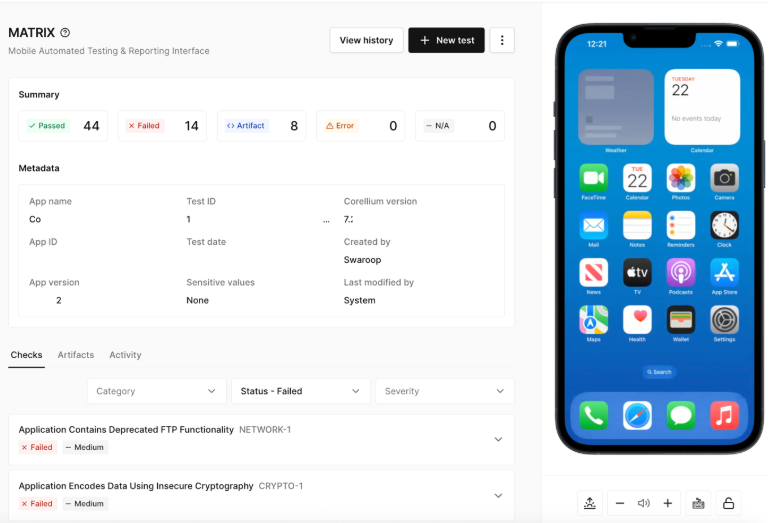
This is where Corellium Viper with MATRIX technology becomes invaluable for end-to-end mobile security. Instead of documenting complex manual testing procedures, MATRIX accelerates the work of mobile app pentesting teams and facilitates AppSec compliance needs through automated testing for both iOS and Android apps. Your team documentation becomes much simpler: "Run MATRIX tests on every build" rather than "Follow these 47 manual testing steps."
The beauty of having automated testing integrated into your workflow is that it makes security accessible to everyone on your team - not just security experts. Developers can run comprehensive security checks during development, QA can validate fixes quickly, and security teams can focus on advanced threats rather than routine vulnerabilities.
Common Mobile App Security Mistakes (And How to Avoid Them)
- Trying to do everything at once: Start small. It's better to do basic testing consistently than to attempt advanced testing once and give up.
- Testing only on physical devices: Virtual environments give you more flexibility and consistency.
- Focusing only on code vulnerabilities: Don't forget about configuration issues, which are often easier to fix and just as dangerous.
- Not integrating with development workflow: Security testing that happens separately from development gets ignored. Build it into your existing processes.
- Expecting perfection immediately: Security is an ongoing process, not a one-time fix. Start with the biggest risks and improve over time.
Easy Wins to Start With
-
Fix hardcoded credentials — Search your code for passwords and API keys
-
Enable proper HTTPS — Ensure all network communication is encrypted
-
Remove debug code — Don't leave debugging features in production builds
-
Minimize permissions — Only request the permissions your app actually needs
-
Enable app signing — Use proper code signing to prevent tampering
Beyond 30 Days: Building a Security Culture
-
After your first month, mobile security becomes an ongoing practice:
-
Monthly security reviews to catch new issues
-
Quarterly process improvements based on what you've learned
-
Annual security assessments to validate your overall approach
-
Continuous education to keep up with new threats and techniques
Beyond 30 Days: Building Long-Term Mobile Security Practices
Automated mobile application security isn't as scary as it seems. You don't need to be a security expert to get started — you just need a plan and the willingness to learn as you go.
By following this 30-day plan, you'll have a solid foundation for mobile security testing. You'll know how to find common vulnerabilities, test your apps systematically, and build security into your development process.
Remember: the goal isn't perfection on day one. The goal is progress. Every vulnerability you find, and fix makes your app more secure. Every test you automate makes your process more efficient. Every team member you train makes your organization stronger.
Mobile application security is a journey, not a destination. But with this 30-day plan, you're well on your way to building apps that users can trust.
Ready to start your mobile security transformation? The best time to begin was yesterday. The second-best time is today.
Keep reading

Mobile App Security Risks: The Hidden Threat in Your App Supply Chain
What Is Security Debt? The Hidden Cost of Delaying Mobile App Security